
Subway Surfers Browser FAQ: What Loaded and What Remains Unverified
A desktop observation of Subway Surfers on PlayZunio: the running scene, visible score, an obstructing overlay and the limits of browser-versus-app claims.

The October 16 desktop check reached an active Subway Surfers run on PlayZunio. That establishes more than a loaded title screen, but less than a complete test of every control or feature. Use this FAQ to understand exactly what the browser session demonstrated.
Did an actual run start?
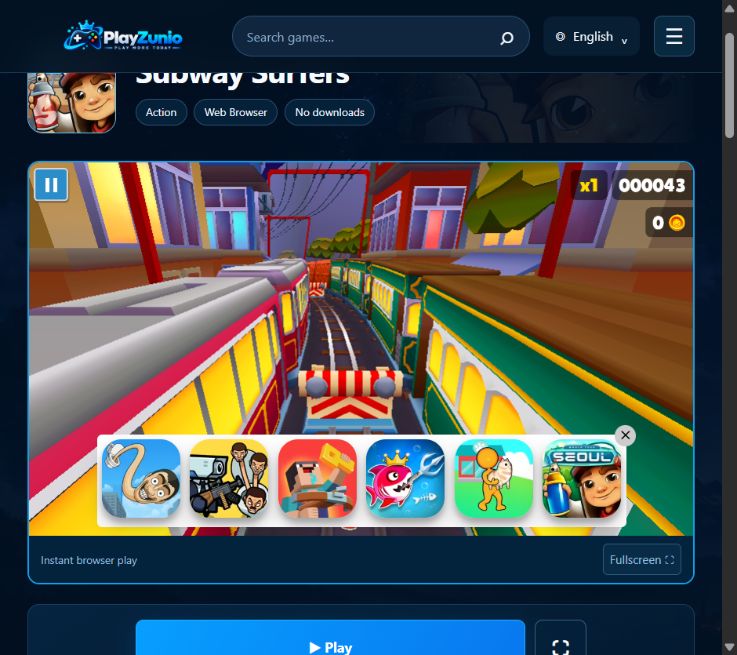
Yes. After the site Play control and the game's start interaction, the scene changed into a run between trains. The captured screen shows a score of 000043, an x1 indicator and a coin counter of 0. These are values from that attempt, not typical performance figures or a scoring formula.
Which controls were confirmed?
Up, Right and Down inputs were attempted during the run. Their individual effects were not isolated well enough to certify jumping, lane switching and rolling separately. A moving scene or increasing score cannot by itself prove that a particular key caused the intended action.
Worked example: score 43, coins 0
Read the two counters separately. This capture shows score progress with no coin collected at that moment. It does not reveal how distance, multipliers or later pickups contribute to the final score. The earlier article's exact score formula was not supported by this observation and has been removed.
For a useful comparison in your own session, record the score and coin count before and after one visible pickup, without changing another setting. If you cannot observe the pickup clearly, leave its contribution unresolved instead of guessing from the final total.
What if an overlay hides the obstacle?
The screenshot shows promotional tiles covering the lower part of the track, including the area where the character approaches a barrier. That affects visibility independently of keyboard response. If an ordinary close control is offered, use it and inspect the track again; this review did not confirm that the overlay could be permanently dismissed. Do not treat clicks on promotional tiles as gameplay input.
Does the browser build include the current mobile events?
That was not established. This test did not verify world-tour updates, unlockable characters, hoverboard behavior, keys, purchases, cloud saves or offline operation. The former claims of full mobile feature parity and no storage footprint have been removed. Features advertised for another edition are not proof of features in this player.
Can I rely on this as a complete playability review?
No. The result is an observed run with limitations: the scene started, but the overlay and incomplete control checks prevent a broader guarantee. No touchscreen session or long-run stability test was performed. Check the game's current page for its present state, and consult the save-data checklist before clearing browser storage.