GoBattle 2: Read the Mini-Game Prompt Before Testing Two Players
A worked MAGNET round observation: the displayed A and Up inputs, the 0–0 result and a sequence for separating a running timer from working controls.
The GoBattle 2 session reviewed on October 16 opened a mini-game called MAGNET. It did not establish the ranked shooter, weapon system or online lobby features described in the previous guide. Those claims, along with the generic aim/shoot control table, have been removed.
The observed sequence
- The game loaded a MAGNET tutorial with A and Up-arrow inputs displayed.
- Skip was selected, then those inputs were attempted.
- The round timer progressed.
- The round ended with a 0–0 tie and Repeat, Home and Next Game controls visible.
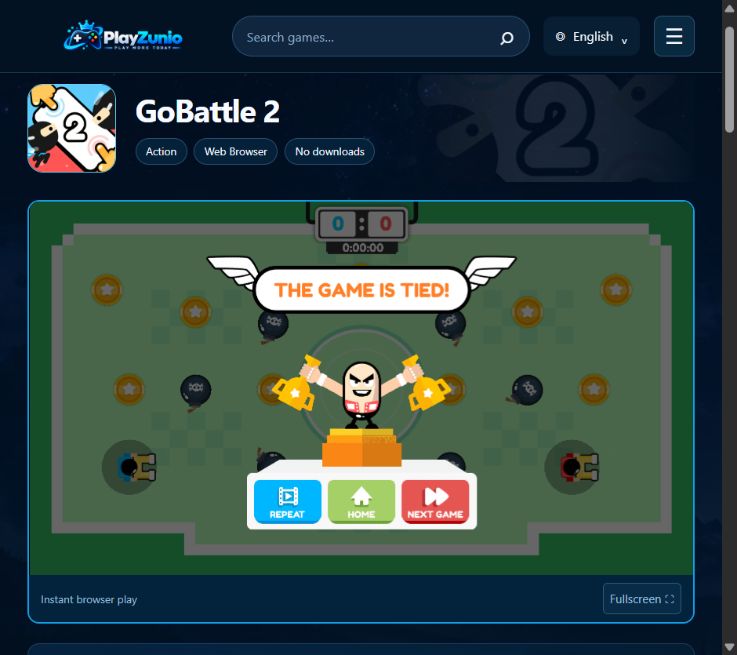
Worked example: what does a 0–0 tie prove?
It proves that the session reached its result screen. It does not show whether both players moved, neither player moved, or a scoring opportunity was missed. The timer finishing is evidence about round progression; a visible response to A or Up would be evidence about input. Keep those conclusions separate.
In this test, neither individual movement nor a scored action was confirmed. We therefore classify the experience as limited, rather than reporting a successful two-player match.
A useful next check for the MAGNET round
- Read the round's own instruction before dismissing it. Record which input belongs to each side.
- Test one displayed input alone and watch for a change in that side's character or object.
- Repeat for the other side, without simultaneously pressing the first input.
- Only after both separate responses are visible, try them together.
- Use the displayed scoring objective to interpret the result. Movement alone is not a scored action.
This is a proposed diagnostic sequence, not a claim that the missing steps were completed during our check. If one input works separately but fails only in combination, the shared-keyboard troubleshooting guide explains how to narrow down the problem without assuming the whole game is unavailable.
Does the same control table apply to every round?
This check covered only the MAGNET prompt and round. Read the instruction again after selecting another mini-game; do not carry a shooter-style WASD/mouse/Space table into a different activity. The visible Next Game control is not proof that every subsequent mini-game works.
What remains unverified?
Both players' effective movement, scoring, simultaneous-key response, other rounds, touch controls, online matchmaking, accounts and saved ranks were not verified. No tested claim of those features is retained. The GoBattle 2 page is the relevant game page; unrelated combat games are not evidence for this game's mechanics.